Benefits of D365 Label Printing Automation
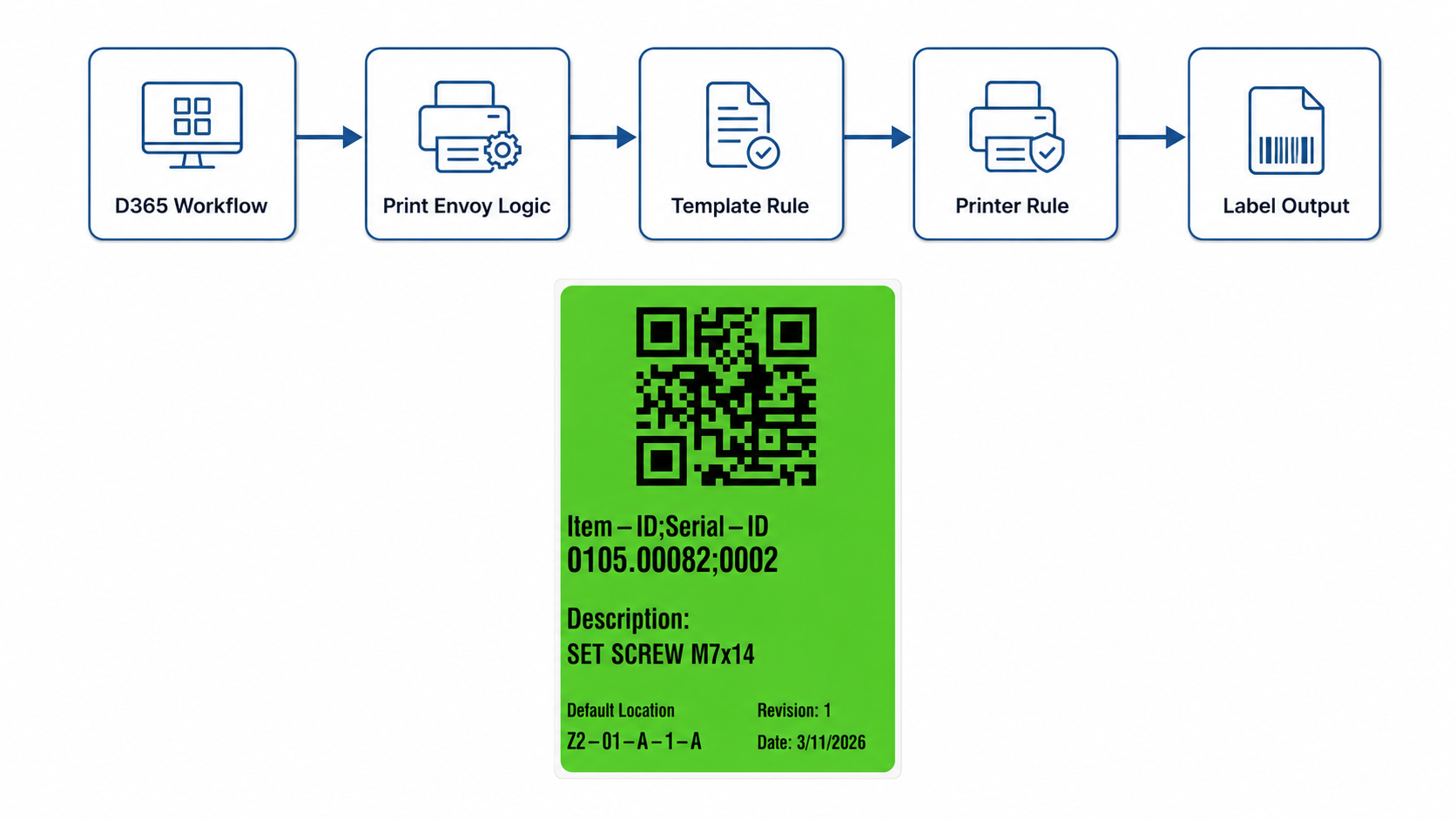
Label printing is not just about sending a file to a printer. In a D365 environment, labels depend on transaction data, label templates, printer destinations, label engines, warehouse locations, production steps, shipping requirements, and support visibility. Print Envoy helps bring those pieces together so D365 label printing becomes more accurate, repeatable, and easier to manage.
What Print Envoy Helps Improve
Fewer Manual Print Decisions
Move label selection and printer selection into configured rules instead of relying on users to remember what to choose.
Better Label Accuracy
Use D365 data and configured label logic to reduce incorrect labels, outdated information, and wrong label formats.
Faster Warehouse Workflows
Support label printing from receiving, inventory, production, packing, and shipping workflows without slowing users down.
Smarter Printer Routing
Route labels by site, warehouse, workstation, zone, label type, user, printer group, or company.
Easier Reprint and Support Control
Give teams a clearer way to understand what printed, where it printed, and when a label may need to be reprinted.
Scalable Label Operations
Add new printers, workflows, warehouses, and label templates without rebuilding the whole process each time.
Reduce Manual Work in D365 Label Printing
In busy warehouse and production environments, label printing should not depend on someone remembering which template to use or which printer to select. Print Envoy helps reduce repeated manual decisions by using configured D365 label printing logic.
When label rules are set up around the workflow, users can stay focused on the transaction they are performing. The system can help determine the correct label behavior based on business context, such as site, warehouse, workstation, label type, or printer group.
Users manually choose labels, printers, and reprint steps.
Configured rules help determine the correct label and printer.
Less guesswork, fewer delays, and a cleaner label printing process.
Improve Label Accuracy with D365 Data
Accurate labels depend on accurate data. Print Envoy supports label printing that uses business data from Microsoft Dynamics 365 workflows, helping reduce errors caused by manual entry or disconnected label processes.
This is especially important for barcode labels, license plate labels, container labels, pallet labels, item labels, production labels, and shipping labels. When the correct data is used in the correct format, teams can reduce wrong labels, wrong quantities, wrong destinations, and unnecessary reprints.
- Item and inventory data
- License plate and container data
- Production, batch, and serial data
- Shipping and customer-specific data
Route Labels to the Right Printer, Area, or Workflow
Printer routing is one of the most important benefits of a stronger D365 label printing solution. Labels should print close to where the work happens. Receiving labels should go to receiving. Production labels should go to the correct line. Packing labels should not mix with shipping labels. Remote sites should be able to use their own printer structure.
Print Envoy helps support more controlled printer routing so labels can be directed based on the operational context.
Printer
Printer
Station
Printer
Device
Printer
Site
Route labels based on the D365 site or operating location.
Warehouse
Send labels to printers assigned to a specific warehouse.
Workstation
Route labels based on the station where the work is performed.
User
Support user-based routing when different teams need different print destinations.
Zone
Use warehouse zones, docks, lines, or areas for more precise label output.
Label Type
Route item labels, license plate labels, carton labels, production labels, and shipping labels differently.
Printer Group
Organize printers by purpose, area, location, or operational team.
Company
Support different routing structures across companies or legal entities.
Support Faster Warehouse, Production, and Shipping Workflows
Label printing should support the work, not slow it down. When labels are printed as part of the D365 workflow, users can move through receiving, inventory, production, packing, and shipping with fewer side steps.
Print Envoy helps make label printing feel like part of the business process instead of a separate task. That can reduce walking, waiting, rework, and confusion around where labels are printed.
Receiving
Print item, license plate, or inbound labels.
Inventory
Print location, inventory, or movement labels.
Production
Print WIP, finished goods, batch, or serial labels.
Packing
Print carton, container, or packing labels.
Shipping
Print pallet, compliance, or customer-specific labels.
Scale D365 Label Printing Across More Sites and Printers
A label process that works for one warehouse may not be enough for multiple warehouses, companies, production areas, shipping teams, and printer networks. As the business grows, label printing needs to stay organized.
Print Envoy helps teams scale label printing by using a more maintainable structure for handlers, templates, printer rules, and output logic. Instead of treating every new label as a separate project, teams can manage label printing as a connected operational process.
Standardize the Structure
Create a clearer model for handlers, templates, rules, printers, and output paths.
Add New Label Types
Support new item, location, license plate, carton, pallet, production, or shipping labels.
Expand Printer Routing
Add printers by warehouse, workstation, site, zone, or printer group.
Support More Workflows
Extend label printing into receiving, production, inventory, packing, and shipping.
Maintain Without Rebuilding
Make changes in a more controlled structure as operations change.