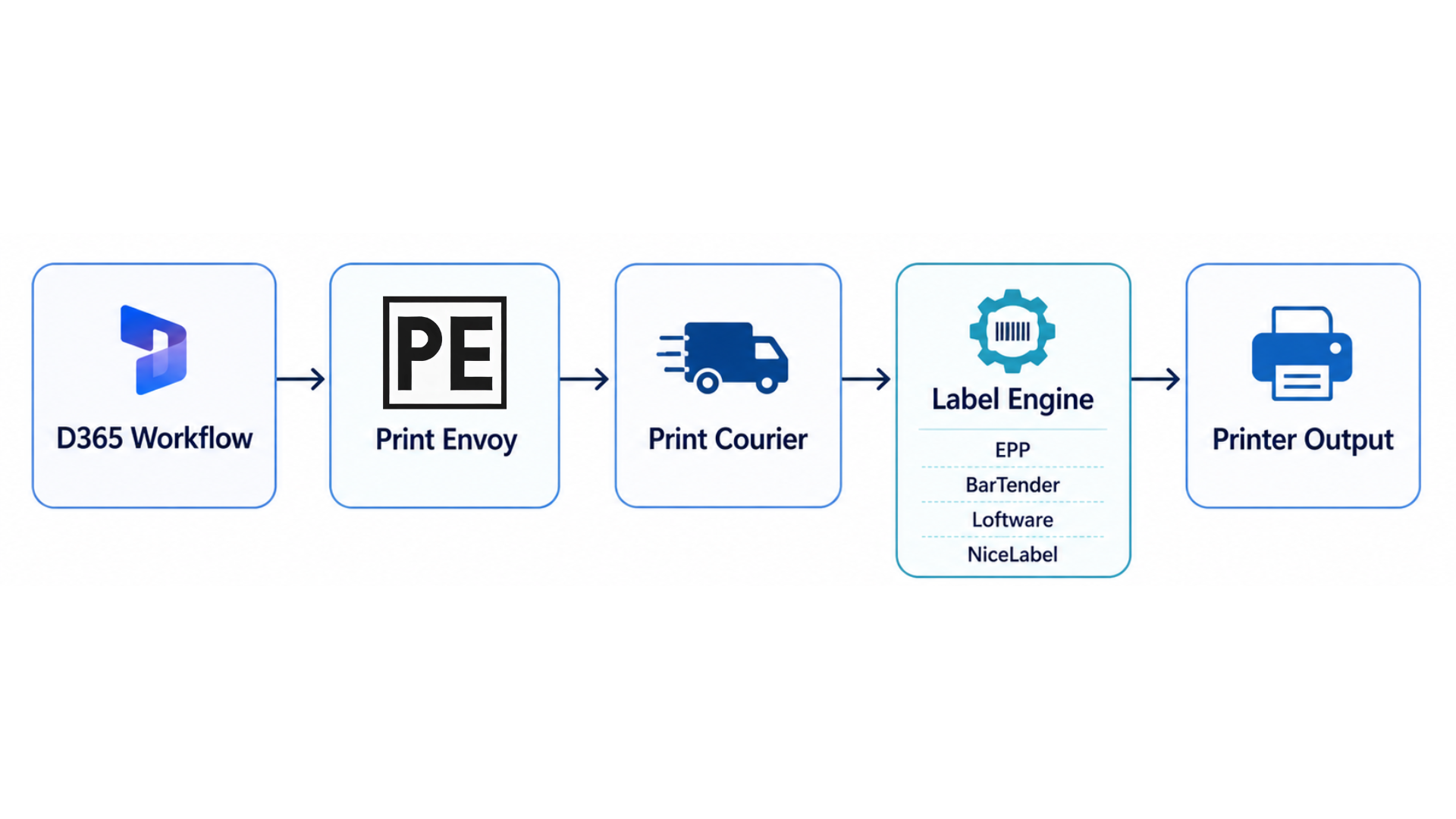
Label printing does not live in D365 alone. It touches servers, label engines, drop folders, printer networks, warehouse stations, production lines, and support teams.
Print Envoy helps connect Microsoft Dynamics 365 with the printing environment around it, so label data can move from a D365 transaction to the right label engine and printer with a cleaner integration path.
The Hard Part Is Not Just Printing the Label
A label may look simple when it comes out of the printer, but several systems usually have to work together before that happens.
D365 holds the transaction data. Print Envoy helps create the label request. Print Courier helps move the label data. The label engine formats the output. The printer produces the physical label.
When those pieces are not aligned, teams may see missing labels, wrong formats, print delays, folder permission issues, or labels that never reach the printer. This page should explain how Print Envoy helps bring those pieces together.
Many companies already have a label engine in place. They may use BarTender, Loftware, NiceLabel, EPP, or another system that watches folders and processes label files.
Print Envoy is designed to work with that kind of enterprise printing environment. Instead of forcing every company into one label design tool, Print Envoy focuses on sending the right D365 label data into the right printing path.
The implementation guide notes that Print Envoy can support label engines that read structured files from drop folders, with common examples including EPP, BarTender, Loftware, and NiceLabel.
Designed to Fit Into Existing Label Environments
Label Engine Integration Options
EPP
A strong fit for high-volume, multi-printer, and enterprise barcode label printing environments. EPP integration is useful when companies need reliable label output across warehouse, production, shipping, and inventory operations.
BarTender
Useful for companies that already manage label formats, printer logic, and template files through BarTender. Print Envoy can help connect D365 label printing events with BarTender-driven label output.
Loftware
Useful for enterprise and compliance-heavy labeling environments where controlled label formats, standardized processes, and regulated label output matter. Loftware integration is a good fit for companies with strict labeling requirements.
NiceLabel
Useful for modern label automation environments that rely on structured data, template mapping, and flexible label design. NiceLabel integration can support companies that want cleaner data-driven label printing from Dynamics 365.
Why Drop Folders Matter in D365 Label Printing
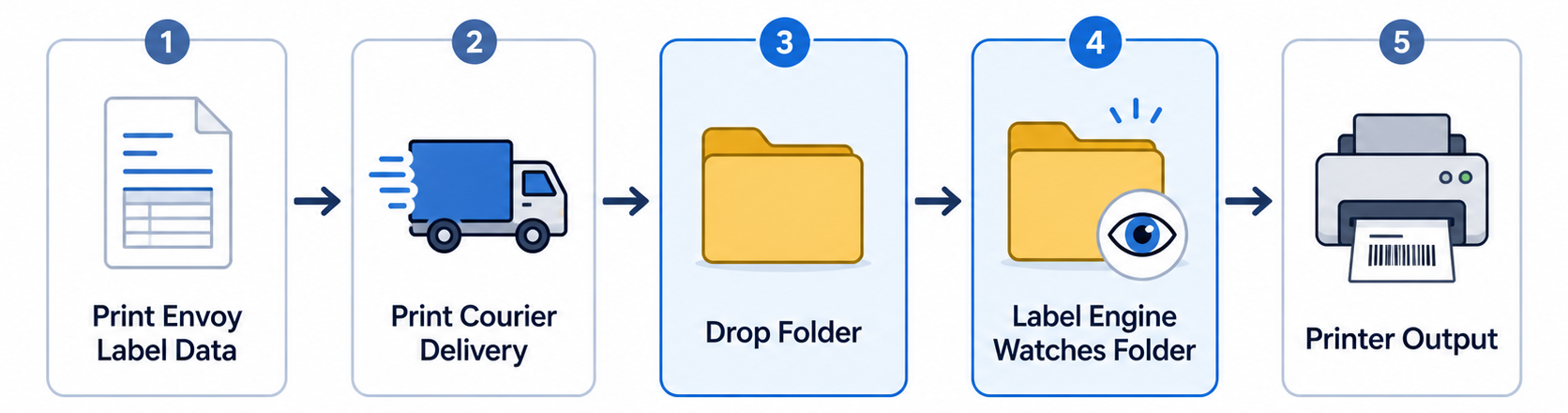
A drop folder is the handoff point between Print Envoy, Print Courier, and the label engine. It is where structured label data becomes available for the label engine to process.
For the integration to work correctly, the folder path, label engine type, permissions, archive location, error handling, and printer rules need to line up. The Print Envoy implementation guide explains that drop folders provide the linkage between Print Envoy and Print Courier, and that drop folder records must match the Print Courier server configuration exactly.
Connect D365 Label Printing to the Systems Around It
Download this one-page summary to review how seamless integration can help D365 label printing connect business transactions, label engines, print services, printer networks, and operational workflows. The full book expands on workflow-based printing, infrastructure strategy, scalable deployment, and enterprise barcode printing integration for Microsoft Dynamics 365.