Secure, Browser-Local ZPL Viewer and Renderer
Preview Zebra Programming Language (ZPL) directly in your browser. Core parsing, rendering, diagnostics, editing, comparison and export run locally with no external label rendering API.
Free to use. Light, Dark and System themes. PNG and multi-label PDF export. No printer required for previewing.
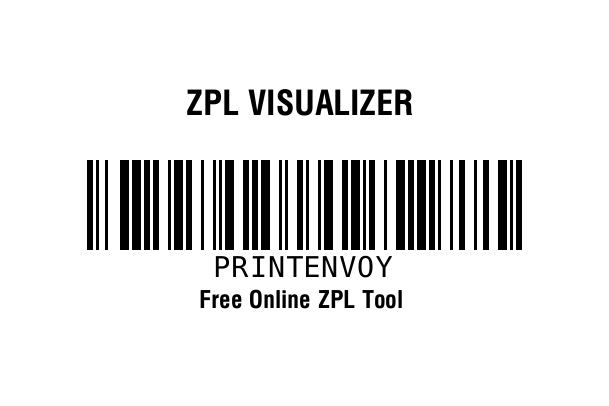
^PW609
^LL406
^FO0,90
^A0N,34,34
^FB609,1,0,C,0
^FDZPL VISUALIZER^FS
^FO87,160
^BY3
^BCN,90,Y,N,N
^FDPRINTENVOY^FS
^FO0,290
^A0N,24,24
^FB609,1,0,C,0
^FDFree Online ZPL Tool^FS
^XZ
Why use a local ZPL renderer instead of a cloud API?
Shipping labels can contain customer names, addresses, order references, lot numbers and other operational data. Print Envoy ZPL Visualizer performs its core ZPL processing in the browser so normal rendering does not require sending label source to an external rendering service.
Keep ZPL in Your Browser
Core parsing, rendering, linting, visual debugging, comparison, transformation and export run locally in the browser.
No Rendering API Round Trip
After the application loads, label rendering happens on the client instead of waiting for a remote label-rendering API response.
No Third-Party Rendering Quota
Core rendering is not tied to a third-party label API request quota or rate limit. Performance depends on the browser, device and label complexity.
Keep shipping and operational label data in your browser
If your organization limits sending customer or operational data to third-party rendering services, a browser-local ZPL workflow can reduce unnecessary data transfer. The Visualizer does not upload normal ZPL sessions to Print Envoy for rendering.
Useful for Restricted Development Environments
Preview labels when security policy, customer confidentiality or internal architecture makes outbound rendering requests undesirable. Local rendering reduces exposure to external label-processing services, but it does not by itself establish regulatory compliance.
Share Links Stay Local to the URL
Advanced View can create a shareable URL-hash session without uploading the session to a server. Anyone with that URL can recover the embedded ZPL, so treat share links as sensitive whenever the label contains private data.
Debug ZPL in Light, Dark or System appearance
Long debugging sessions are easier when the tool matches your preferred workspace. ZPL Visualizer v4.4.5 includes Light, Dark and System appearance options while keeping the same local rendering engine and label semantics.
Dark Mode
Use a darker workspace when you prefer lower-glare editing and preview controls.
Light Mode
Use a bright interface for daytime work, presentations and familiar browser-based development.
System Mode
Let the Visualizer follow the appearance preference configured on your operating system or browser environment.
Render and export ZPL without a remote label API
Use the Visualizer as a browser-local ZPL to PDF and ZPL to PNG workflow. Render the label, review diagnostics, then export output for documentation, support cases, approvals or development handoff.
ZPL to PNG
Export the current rendered label as a PNG image. The Visualizer can also embed source-related metadata in PNG output.
Multi-Label ZPL to PDF
Split multi-label ZPL streams and export rendered output to PDF for review, archiving or documentation.
Save the Original ZPL
Keep the source ZPL alongside rendered output so troubleshooting and production validation remain tied to the actual label code.
More than a simple ZPL preview
Standard View keeps everyday rendering simple. Advanced View adds deeper inspection tools for developers, support teams and label specialists troubleshooting complex Zebra label behavior.
Diagnostics and Linting
Review syntax, compatibility, bounds and rendering diagnostics to find likely problems before testing on physical media.
Compare and DPI Compare
Compare ZPL versions, inspect source differences and evaluate how dot-based layouts behave across common printer densities.
ZPL Knowledge Center
Use the command dictionary and task-oriented ZPL Guide to understand commands, parameters, examples and related behavior.
Multi-Label Streams
Work with ZPL containing multiple ^XA and ^XZ label formats instead of being limited to one label at a time.
Visual Editor and Overlays
Inspect field placement, bounds and label geometry with visual editing and diagnostic overlays.
Round-Trip and Test Lab
Use deterministic in-browser checks, round-trip inspection and packaged test tools as supplementary development evidence before final printer validation.
Answers for common ZPL development roadblocks
Use the Visualizer when you need a fast answer to a specific ZPL problem without starting with a physical printer or an external rendering API.
From ZPL source to local label preview in three steps
Paste or Open ZPL
Paste Zebra Programming Language into the editor or open a local ZPL, TXT or PRN file.
Render and Inspect Locally
Generate the label in your browser and review text, barcodes, graphics, coordinates, dimensions and diagnostics.
Correct, Compare and Export
Refine the source, compare revisions or DPI behavior, then save ZPL or export PNG and PDF output.
Local ZPL Viewer and Renderer FAQ
Does my ZPL leave the browser when I render it?
For normal WordPress use, core parsing, rendering, diagnostics, editing, comparison and export run locally in the browser. ZPL Visualizer does not require an external label-rendering API for these workflows.
How can I preview ZPL without sending data to an API?
Open the Print Envoy ZPL Visualizer, paste or open your ZPL, and render it directly in the browser. No external rendering API is required for the core preview workflow.
Can I use the ZPL Visualizer as an offline ZPL renderer?
The rendering engine is client-side and does not require an external rendering API after the application has loaded. Accessing the hosted web page initially still requires normal web access unless the application is deployed or cached in an environment that supports offline use.
Does the ZPL viewer have dark mode?
Yes. ZPL Visualizer v4.4.5 includes Light, Dark and System appearance options.
Can I convert ZPL to PDF locally?
Yes. The Visualizer renders in the browser and supports PDF export, including multi-label ZPL workflows.
Can I export ZPL to PNG?
Yes. You can export the rendered label as PNG for documentation, tickets, review or collaboration.
Can I share a ZPL session without uploading it?
Advanced View can create a URL-hash share link that encodes the ZPL and basic viewing settings in the URL instead of uploading the session. Anyone with the link can recover that ZPL, so share it carefully.
Is browser rendering identical to a physical Zebra printer?
No browser visualizer should replace final printer validation. Printer model, firmware, media, calibration, installed fonts and device-specific behavior can affect production output.
Open the local ZPL Visualizer
Paste your ZPL, render it in the browser, inspect diagnostics and export the result without relying on an external label-rendering API.
Need to automate label printing from Microsoft Dynamics 365?
ZPL Visualizer helps developers preview and troubleshoot label code. Print Envoy connects Dynamics 365 workflows to configurable label logic, printer routing and operational print processes.